
What to Do After Buying a Domain: Setup Step by Step
Bought a domain and not sure what comes next? Point it to your site, choose where DNS lives, turn on HTTPS and check that it works, step by step.
Right after the purchase a domain shows nothing, and that is normal: a new domain has no DNS records yet, so nothing tells the internet where to send visitors. To make it work you need to settle three things: where the DNS records live, which server or service the domain points to, and how HTTPS is switched on. Below is the whole path step by step, from a purchase at Riki Domains to a site that opens over a secure connection. The setup itself takes a few minutes; after that you only wait for the changes to spread.
The short answer
- Standard (.com, .top, .xyz, .online and others): in the panel the domain is usually active 10–30 seconds after the order is confirmed, but it has no DNS records. Add an A record or connect Cloudflare.
- Titan (.at, .to and others): the domain runs on your own nameservers, usually Cloudflare's. For .at and .to the bot asks for them right after payment.
- A site on your own server: two A records, for
@and forwww, with the server IP. - A site at a hosting provider or site builder: whatever its instructions say: an A record, a CNAME or a nameserver change.
- HTTPS: through Cloudflare or with a free Let's Encrypt certificate on the server.
- Check:
nslookupordigreturn the expected IP, and the site opens over https.
Step 1. Check the domain's plan
The plan decides who registers the domain and what you do after payment. In the panel the plan is shown next to the domain name; in the bot it is chosen before the search.
| Plan | Example zones | How it is registered | What to do after the purchase |
|---|---|---|---|
| Standard | .com, .top, .xyz, .online, .pro, .info | Automatically, in the panel usually within 10–30 seconds | Add DNS records in the bot or the panel, or connect Cloudflare |
| Platinum | .ac, .com.de, .com.se, .org.uk | By a staff member, with Riki Domains' details | Set up DNS the same way as on Standard |
| Titan | .at, .to, .co.com, .com.co | By a staff member, with Riki Domains' details | Provide your own nameservers, usually Cloudflare's. For .at and .to the bot asks for them right after payment |
Prices for every zone are on the prices page, and the rules of each zone are on its own page, for example .com or .at.
Step 2. Decide where the DNS records live
DNS records take effect wherever the domain's nameservers point. There are three options.
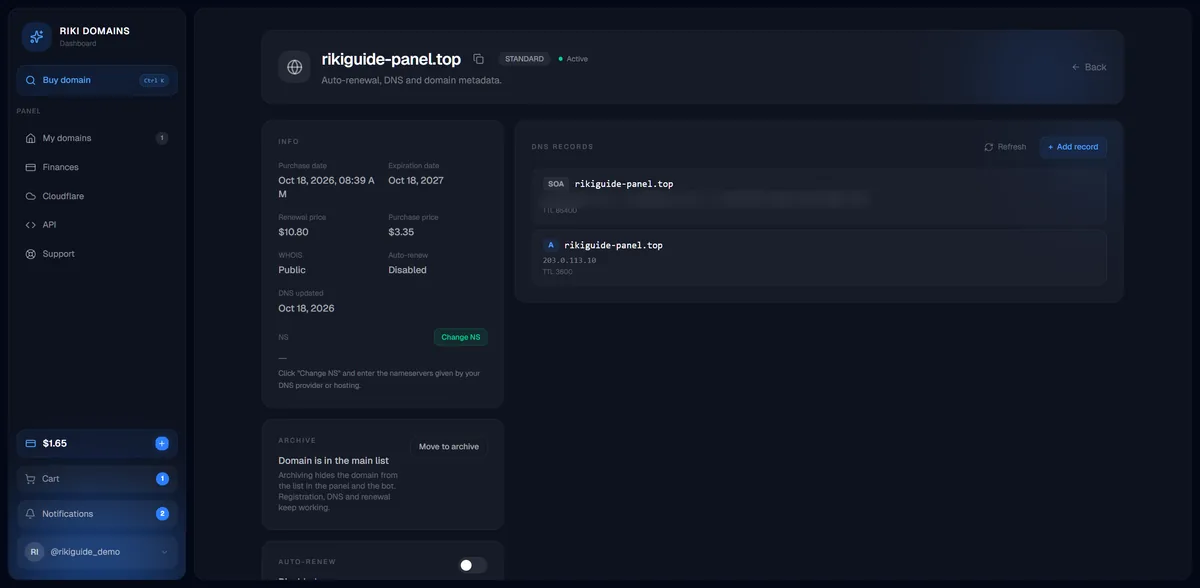
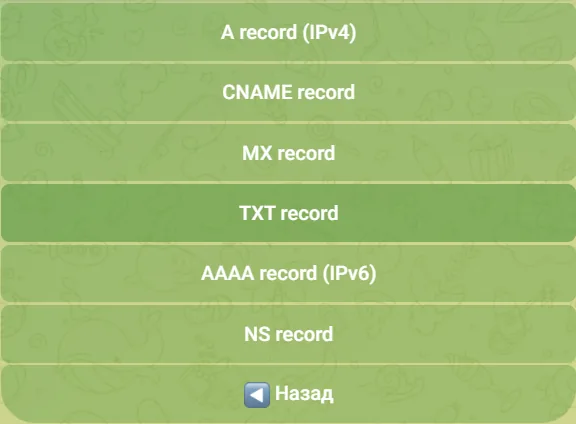
- The Riki Domains DNS Manager. It works right after the purchase with nothing to connect. In the bot @riki_domains_bot: My domains → the domain → DNS Manager. In the web panel: My domains → the domain → Add record. Record types A, AAAA, CNAME, MX, TXT and NS are available. This is the simplest route for a single site.
- Cloudflare. The free plan gives you DNS, an HTTPS certificate and a proxy that hides the server IP. New domains can be connected to Cloudflare automatically, and existing ones by hand with a nameserver change. Both ways are described in How to connect a domain to Cloudflare.
- Your hosting provider's nameservers. If a host or site builder asks you to delegate the domain to its servers, click Change NS on the domain card in the panel and paste the servers from its instructions, two to four of them.
Keep your records where the nameservers point right now. After a move to Cloudflare or to a host, only the records at the new DNS provider count, so edit them there. What nameservers are and why changes are not visible at once is explained in Nameservers and DNS propagation.
Step 3. Point the domain to your site
A site on your own server (VPS). You need two A records: one for the domain root and one for www. In the bot the input format is the same for every record type: @value for the root and subdomain@value for a subdomain. For a server at 203.0.113.10 that is @203.0.113.10 and www@203.0.113.10.
In the panel the same record is added with a form: type A, host @, the IP address as the value, and TTL. Once saved, the record appears in the list next to the service SOA record.
AAAA records belong only on servers that really have IPv6 configured. An AAAA record with a wrong address breaks the site for visitors on IPv6, and you are unlikely to notice it from your own computer.
A hosting provider or site builder. It gives you one of three things: an IP address for an A record, a hostname for a CNAME (most often for www), or its own nameservers. Do exactly what its instructions say. By the DNS standard a CNAME is not placed on the domain root when other records live there, so the root gets A records. Cloudflare works around this limit with a feature called CNAME flattening.
What every record type does, with examples for a site and for mail, is covered in DNS records A, AAAA, CNAME, MX, TXT and NS explained.
Step 4. Turn on HTTPS
Through Cloudflare. Once the domain is active, Cloudflare issues a free certificate on its own. Under SSL/TLS choose Full (strict) if the server has a valid certificate, or Full if the certificate is self-signed; these are the modes Cloudflare recommends. Flexible only encrypts the leg between the visitor and Cloudflare. If the server itself redirects to https, the browser shows ERR_TOO_MANY_REDIRECTS.
Without Cloudflare. A free Let's Encrypt certificate does the job: hosting panels usually enable it with one button, and on your own server it is issued with certbot. With the standard check the certificate is issued only once the domain already points to the server, so finish step 3 first and wait until the records answer.
Register a domain in 2 minutes
1,500+ zones, WHOIS privacy on request, crypto payment and DNS management — all inside the Telegram bot.
Step 5. Check that everything works
Ask a public resolver directly, so that your provider's old cache does not get in the way:
nslookup example.com 1.1.1.1ordig +short example.com @1.1.1.1show the IP address the domain points to.nslookup -type=ns example.com 1.1.1.1ordig +short ns example.com @1.1.1.1show the domain's nameservers.
If the answer matches what you expect, open the site with https://. New records are usually visible within minutes. A nameserver change takes longer: Cloudflare says up to 24 hours, and the Riki Domains API documentation says up to 48 hours. The domain card in the bot also has a Check availability button that quickly tells you whether the domain responds.
If the site still does not open after a day, follow the checks in Domain not opening in order: registry statuses, nameservers, the DNS answer, the hosting.
Step 6. Email on the domain (if you need it)
A mail service will ask you to add MX and TXT records: SPF with the servers allowed to send mail, DKIM with a signing key, and DMARC with a rule for forged messages. Add them exactly as its instructions say.
If the domain will not send mail at all, still add two TXT records so that nobody can send forged mail in its name:
- on the domain root:
v=spf1 -all(no server may send mail for the domain); - on the
_dmarcsubdomain:v=DMARC1; p=reject(receivers should reject such messages).
Step 7. Renewal and keeping the account tidy
- Turn on auto-renewal on the domain card. The domain then renews itself while the balance covers it. The renewal price is shown on the card and for cheap zones is usually higher than the purchase price: in the example above a .top domain was bought for $3.35 and renews for $10.80.
- Archive what you do not need to see. Move to archive hides the domain from the list in the bot and the panel, while registration, DNS and renewal keep working.
If the domain is on Titan: .at, .to and others
Titan domains run on your own nameservers, usually Cloudflare's. A staff member registers .at and .to domains manually with Riki Domains' details: after payment the bot waits for the nameservers, and the domain is registered once they arrive.
This is where people get stuck: Cloudflare only onboards domains that are already registered, so you cannot get a nameserver pair for a new .at domain in advance. If your Cloudflare account already has domains, send their nameserver pair: Cloudflare tries to give all domains in an account the same names. After registration, add the new domain to Cloudflare and compare the pair it was assigned. Details are in the .at and .to section of How to connect a domain to Cloudflare.
Do not send generic names such as ns1.cloudflare.com. Cloudflare serves a domain only on the two servers it assigned, and with any other names the domain will not resolve.
Common mistakes
- Waiting for a site with no records. A domain without an A record, or without nameservers that hold records, will never open.
- Creating a record for the root only. Without a record for
www, the www address does not open, and many people type exactly that. - Leaving a stray AAAA record. Visitors on IPv6 land on the wrong address, and the owner does not see the problem from their own computer.
- Editing records in the wrong place. After a move to Cloudflare or a host's nameservers, only the records at the new DNS provider count.
- Choosing Flexible in Cloudflare while the server redirects to https itself. The result is ERR_TOO_MANY_REDIRECTS.
- Typing nameservers from memory. The pair comes from your DNS provider or host and must be copied exactly.
- Expecting a nameserver change to apply instantly. It takes hours, not minutes.
Checklist after the purchase
- Check the domain's plan in the panel or the bot.
- Decide where the DNS records live: the DNS Manager, Cloudflare or your host.
- Add A records for
@andwww, or do what the host asks. - Turn on HTTPS through Cloudflare or Let's Encrypt.
- Check the DNS answer with
nslookupordigand open the site over https. - Add mail records, or block mail from being sent in the domain's name.
- Turn on auto-renewal and keep a reserve on the balance.
Without setup a domain is just a name. An A record, HTTPS and auto-renewal turn it into a working address, and that takes a few minutes. Everything else depends on DNS, and the commands from step 5 make it easy to check.
FAQ
Why doesn't my domain open right after I buy it?
A new domain has no DNS records yet, so nothing tells the internet which server should receive visitors. Add an A record with your server IP in the DNS Manager of the bot or the panel, or connect the domain to Cloudflare. A new record usually starts answering within a few minutes.
How long does it take for a new domain to work?
A new DNS record is usually visible within a few minutes. A nameserver change, such as a move to Cloudflare, takes longer to spread: Cloudflare says up to 24 hours, and the Riki Domains API documentation says up to 48 hours.
How do I connect a domain to my hosting or site builder?
Do what the hosting instructions say: usually an A record with its IP address, a CNAME record pointing to its hostname, or a switch to its nameservers. Records are added in the DNS Manager of the bot or the panel; nameservers are changed with the Change NS button on the domain card in the panel.
Do I need Cloudflare for a new domain?
Not necessarily: an A record in the DNS Manager is enough for a simple site. Cloudflare helps when you want free HTTPS without configuring the server and want to hide the server IP. Titan domains such as .at and .to run on your own nameservers, which are usually Cloudflare's.
What should I do after paying for an .at or .to domain?
Send the bot the nameservers the domain will use, usually a Cloudflare pair. A staff member registers these domains manually once the nameservers arrive. Where to get a nameserver pair for a domain that is not registered yet is covered in the guide to connecting a domain to Cloudflare.
Register a domain in 2 minutes
1,500+ zones, WHOIS privacy on request, crypto payment and DNS management — all inside the Telegram bot.