
Buy a Domain With Bitcoin: Steps, Network Fees and Timing
How to buy a domain with Bitcoin at Riki Domains: a BTC top-up, a QR code with the amount, a 15-minute rate lock, network fees, confirmation time and mistakes.
Bitcoin is the best-known cryptocurrency, and you can buy a domain with it the same way as with stablecoins: top up the balance and pay for the cart. The differences from USDT are in the details. Bitcoin blocks arrive less often, the fee depends on network load, and the transfer has to go out within the 15 minutes while the rate is locked. Below is the whole path at Riki Domains step by step, with what the payment page shows and the mistakes that leave a payment stuck. The process is current as of November 2026.
The short answer
- BTC is accepted on the Bitcoin network: you top up the balance on the payment page and buy domains from the balance.
- The rate is locked for 15 minutes. Within that time send the exact amount shown on the page, down to the last digit.
- The QR code for BTC includes the amount: your wallet fills it in, and you only check the address, the amount and the network.
- The sender pays the network fee on top of the invoice amount. It does not depend on the amount, so topping up for several purchases at once is cheaper.
- Credit comes after network confirmation. A block arrives every 10 minutes on average; with a low fee it takes longer.
- No ID or card: you sign in through the Telegram bot or with a username and password in the web panel.
How payment works
At Riki Domains you pay through an internal balance kept in dollars. You top it up in crypto, and purchases and renewals are charged to the balance. The payment page accepts USDT (TRC-20 and BEP-20), USDC (ERC-20), TRX, BNB, POL, ETH and BTC. The minimum top-up is $1, and domain prices do not depend on the coin: .top costs $3.35 and .com $26.15 as of the 17 October 2026 price snapshot, with every other zone on the prices page.
The balance suits Bitcoin especially well: one transfer with one network fee can pay for several domains and future renewals.
Step by step: from finding a name to the credit
- Find a domain. In the bot @riki_domains_bot: Buy domains, a plan, then a keyword or an exact address. In the web panel it is the same through Buy domain. Add the names to the cart.
- Create a top-up. If the balance is short, the bot offers to top it up by the missing amount; or open Top up balance and enter an amount in dollars. The bot gives you a link to the payment page.
- Choose BTC. At the first step of the page open the coin list, pick BTC (Bitcoin) and select Continue.
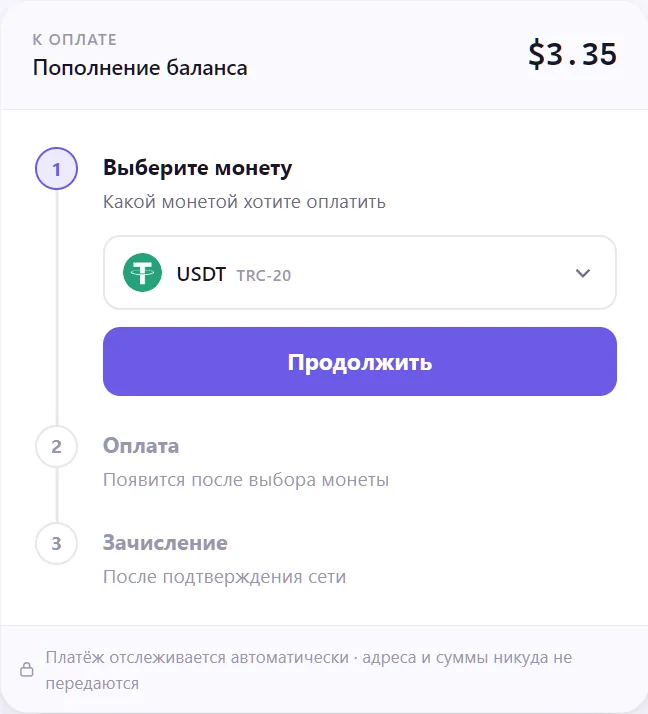
- Check the details. The page shows the amount in BTC, the address, the payment ID and a QR code, with a "Rate locked for 15:00" timer above them. The QR has two modes: With amount (the wallet fills in both address and amount) and Address only. For BTC the page reminds you to select the Bitcoin network in your wallet and to check the recipient and amount before sending.
- Send the exact amount from your own wallet. The amount must match down to the last digit, and the network fee comes on top. Keep the payment ID and the transaction hash.
- Wait for the credit. The page updates itself: first Payment received, then Credit, after network confirmation, and finally Payment credited with the top-up amount.
- Pay for the cart in the bot or the panel. In the panel Standard domains are usually active 10–30 seconds after the order is confirmed.
What to do with the domain next is covered in What to do after buying a domain.
Network fees: how much and who pays
On the Bitcoin network the sender pays the fee, and it is not deducted from the invoice amount. Its size depends not on the amount sent but on the transaction size in bytes and on how busy the network is at that moment. Wallets usually offer several rates: faster and more expensive, or slower and cheaper.
That leads to three practical rules:
- Top up for several purchases at once. The fee for sending $5 and for sending $50 is about the same, so paying for each $3 domain separately in Bitcoin makes little sense.
- Do not cut the fee too far. The rate is locked for 15 minutes, and a minimum-fee transaction can wait a long time for confirmation.
- For small amounts, compare with USDT. On TRC-20 and BEP-20 the fee is usually lower and more predictable; details are in Buy a domain with USDT TRC-20.
How long it takes
A Bitcoin block arrives every 10 minutes on average, and the time to the first confirmation depends on the fee: a low-fee transaction can skip several blocks. While the page shows Payment received, the money is on its way: wait for Payment credited and do not send anything again.
If the page shows Payment failed, for example because the amount did not match the invoice or the transfer went out after the timer, do not send a new payment blindly. Message support in the bot with the payment ID and the transaction hash: with them the payment is found and credited by hand.
Register a domain in 2 minutes
1,500+ zones, WHOIS privacy on request, crypto payment and DNS management — all inside the Telegram bot.
Common mistakes
- Rounding the amount. The page matches the transfer by the exact amount. Send precisely what it shows, down to the last digit.
- The exchange took its fee out of the amount. Many exchanges deduct the withdrawal fee from the amount sent, so less arrives at the address. Set the withdrawal amount so that the recipient sees exactly the invoice amount.
- The wrong network. Exchanges often let you withdraw BTC on several networks, including BEP-20 and Lightning. You need the Bitcoin network; the address on the page was issued for it.
- Sending after the timer. The rate holds for 15 minutes. If the transfer goes out later, the BTC amount may no longer match the invoice: create a new invoice and pay that one.
- Too low a fee. The transaction sits unconfirmed while the network is busy. If your wallet supports fee bumping (RBF), raise the fee; if not, wait for the confirmation and contact support.
- Sending a second time before the credit. A repeat transfer to the same invoice has to be sorted out through support. Check the status on the page and in your wallet first.
Privacy when paying with Bitcoin
The Bitcoin blockchain is public: amounts, addresses and times of transfers are visible to anyone. No card or ID is needed to pay, but if you withdraw BTC from an exchange where you passed verification, the transfer is linked to your exchange account. If the domain should not be associated with your main wallet, pay from a separate wallet and do not reuse addresses. Renew the same way: a single card payment a year later ties the domain to a name just as firmly as the first one would.
The domain's public record is a separate matter. In Standard zones the WHOIS privacy option for $10 hides the owner's details; in Platinum and Titan the domain is registered with Riki Domains' details. What stays hidden at each step and what does not is covered in Anonymous domain registration.
When Bitcoin is not the best choice
- A single cheap domain. The network fee can be comparable to a $3 domain. For small amounts USDT on TRC-20 or BEP-20 is more convenient.
- You need speed. Confirmation on Tron takes minutes; on Bitcoin, 10 minutes or more.
- Your coins sit on an exchange on another network. Moving BTC across networks for one payment adds fees and the risk of picking the wrong network.
A comparison of all payment options and the full no-card path are in How to buy a domain with crypto, and the list of cheap zones is in Cheap domains for crypto.
Bitcoin payment checklist
- Build the cart, ideally with several domains at once.
- Create a top-up and open the payment page.
- Pick BTC (Bitcoin) and select Continue.
- Send the exact amount on the Bitcoin network within 15 minutes, with the fee on top.
- Keep the payment ID and the transaction hash.
- Wait for Payment credited and pay for the cart.
Bitcoin works well for paying for a domain once you account for its quirks: top up with a margin, do not skimp on the fee and send within 15 minutes. Then the transfer goes through like any other, and the new domain is ready to set up.
FAQ
Can I buy a domain with Bitcoin?
Yes. At Riki Domains you top up the balance in BTC on the Bitcoin network on the payment page and buy domains from the balance in the bot or the web panel. Prices are the same as with any other coin, and no ID or card is needed.
How long does a BTC payment take to credit?
After you send, the page shows Payment received and then Credit, after network confirmation. A Bitcoin block arrives every 10 minutes on average, and a low-fee transaction can wait longer for confirmation. Once credited, the money is available for purchases right away.
What fee do I pay when paying with Bitcoin?
The sender pays the network fee on top of the invoice amount. It depends on network load and transaction size, not on the amount sent, so topping up once for several purchases is cheaper than paying for each domain separately.
Can I pay with Bitcoin from an exchange?
The payment page recommends paying from your own wallet and sending the exact amount down to the last digit. An exchange works if it sends exactly the invoice amount on the Bitcoin network within the 15 minutes while the rate is locked. If the amount does not match, contact support with the payment ID and transaction hash.
Is Lightning accepted?
No. In the payment page's coin list BTC is on the main Bitcoin network, and Lightning is not listed. Send a regular Bitcoin transaction to the address on the page.
Register a domain in 2 minutes
1,500+ zones, WHOIS privacy on request, crypto payment and DNS management — all inside the Telegram bot.